
There is a version of the iPad that most people carry around for emails, notes, and the occasional Netflix session. And then there is what the iPad Air M4 has become in 2026: a device that handles 4K video editing, AI-powered tasks, and full creative workflows without flinching.
If you have been wondering whether it is worth your money or whether it can hold up to the kind of work you do, here is an honest look at what it can and cannot do.
What Apple Put Inside It
Apple announced the iPad Air M4 in March 2026 with an 8-core CPU, a 9-core GPU, and 12GB of unified memory, up 50% from the 8GB on the M3 model. Memory bandwidth has jumped to 120GB/s.
In benchmark testing by Notebookcheck, it scored 3,735 in Geekbench 6 single-core and 13,494 in multi-core, figures that put it ahead of several laptops currently on the market.
The Neural Engine, which handles on-device AI tasks, is 3x faster than the one in the M1 version of the same tablet. That improvement shows up in everything from photo processing to real-time transcription inside third-party apps.
Taking Notes: Where It Feels at Home
When paired with the Apple Pencil Pro, handwriting recognition in apps like Goodnotes is fast, smooth, and accurate. The Pencil connects magnetically to the side of the device and charges wirelessly.
iPadOS 26 adds a redesigned Files app, improved windowing through Stage Manager, and a new Preview app built for annotating PDFs. For students or professionals whose days revolve around reading, writing, and marking up documents, this setup is hard to match.
Creative Work: Illustration, Design, and Photography
Apps like Procreate and Pixelmator Pro run without lag, and the P3 wide colour display renders accurate colours that matter when working on detailed illustrations or photo retouching.
The display does not support ProMotion, so you are working at 60Hz rather than 120Hz. For most artists, this is not a dealbreaker, but it is worth knowing before you buy.
If you plan to buy iPad online, configure it with up to 256GB of storage from the start. The base 128GB fills up faster than expected when saving large Procreate files or exporting edited images. If heavy creative work is a regular part of your day, the extra storage is not optional; it is necessary.
Video Editing: The Surprising Part
The iPad Air M4 shines here. Final Cut Pro handles 4K timelines without dropping frames, and the M4 chip manages colour grading, transitions, and multi-track audio without the slowdown you might expect from a tablet.
Reviewers at Mark Ellis Reviews and Tech Edu Byte both noted that real-world editing on the iPad Air M4 is comparable to working on the iPad Pro, with the performance gap between the two much smaller than the price gap suggests.
Under prolonged heavy use, the area near the Apple Pencil charger can get warm. It does not reach uncomfortable levels, but it is worth knowing during long editing sessions.
AI Workflows: What the Neural Engine Adds
The faster Neural Engine powers practical things: removing video backgrounds in Final Cut Pro, finding specific subjects inside your photo library, and running AI features in productivity apps without sending data to a server.
With 12GB of RAM, the iPad Air M4 holds more in memory at once. Switching between a video project, a browser tab, and a notes app happens without the reload delays that were common on older models.
The Accessories That Complete the Setup
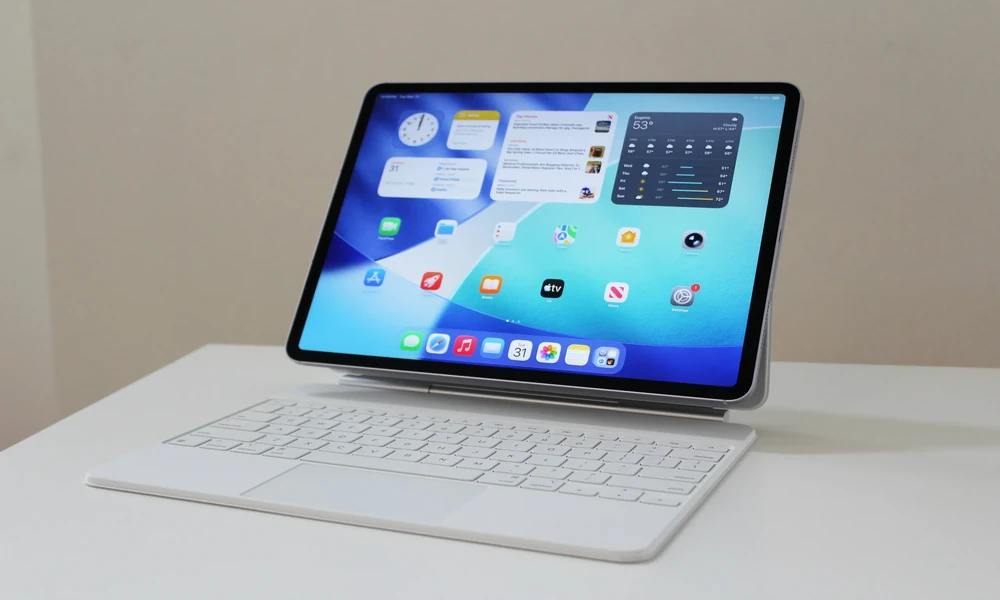
The Magic Keyboard for iPad Air adds a trackpad and a function row, attaching magnetically with no Bluetooth pairing needed.
The right iPad accessories change what the device is capable of. A keyboard turns it into a laptop substitute for travel. A Pencil turns it into a sketchbook, a planner, or an annotation tool.
Protecting What You Have Paid For
Given the price involved, AppleCare for iPad is worth adding alongside the device. AppleCare+ covers accidental damage, battery replacement, and 24/7 support from Apple. For something you carry around every day, that cover makes practical sense.
Conclusion
The iPad Air M4 is not a device you settle for. It is a deliberate choice. From handwritten notes in a morning lecture to a 4K edit on an evening flight, it moves between tasks without asking you to slow down.
The 11-inch model has chip performance, memory, and software depth; it is a machine that will stay relevant for years.